R
usethis::create_package("C:\01-projects\data-template")We will start by initiating a package skeleton. There are several possible approaches to creating this skeleton, we will rely on a convenient package, usethis1, together with git and GitHub CLI.
As we are going to create a data package, this tutorial will use datatemplate as the package name. To initialize this name as a package project we can use the following command in our R console:
R
usethis::create_package("C:\01-projects\data-template")The path (C:\01-projects\data-template), should be an empty directory on your computer. Experience suggests that it is a good idea to avoid cloud storage.
As is evident from the action in the console, create_package() sets up a package skeleton, including a DESCRIPTION file containing the meta data describing the package.
Next we want to initialize git, and create an online repository. We could use the terminal to first call git and initilize, followed by GitHub CLI to create a repository, using the following commands:
bash
git init
gh repo create
The command gh repo create let’s you “Push an existing local repository to GitHub”. Since we are in the project folder we want to push we will leave the path to (.), and select the appropriate owner of the project. That’s it!
Alternatively, we could use usethis::use_git() and usethis::use_github() to accomplish the same result.
DESCRIPTIONThe DESRIPTION file contains the metadata for an R package.
The unedited file look likes this:
DESCRIPTION
Package: datatemplate
Title: What the Package Does (One Line, Title Case)
Version: 0.0.0.9000
Authors@R:
    person("First", "Last", , "first.last@example.com", role = c("aut", "cre"))
Description: What the package does (one paragraph).
License: `use_mit_license()`, `use_gpl3_license()` or friends to pick a
    license
Encoding: UTF-8
Roxygen: list(markdown = TRUE)
RoxygenNote: 7.3.2
The description file is structured with name-value pairs, separated with a colon. There are standards for writing, e.g., the title (Title Case, less than 65 characters), and Description (One paragraph, each line less than 80 characters, line intendention 4 spaces) (Wickham, Çetinkaya-Rundel, and Grolemund 2023, chap. 9).
A license makes it clear to users of your package how they can use, modify or redistribute your work. For a package mainly containing data, Wickham, Çetinkaya-Rundel, and Grolemund (2023) suggest using a CCBY license (Creative Commons Attribution 4.0) or CC0 (Creative Commons Zero v1.0 Universal). The CCBY license require users to give attribution to credit the creator of the work. This license is common for open access scientific papers. The CC0 requires no credit to the author of the work. Other licenses could be more suitable for a package containing code.
To select a license and update the package metadata we can use:
R
usethis::use_ccby_license()This will update the description file and add a LICENSE.md to the project root directory.
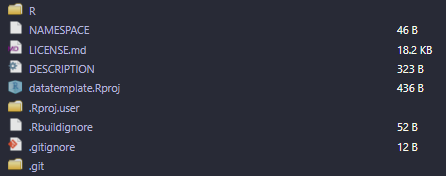
In the package project repository we will now have the basic structure of a package in place (Figure 9.1). The R/ folder is where we will keep any functions. Functions will be loaded when we install and activate the package and made available to the users of the package in their R session. The NAMESPACE file is automatically rendered by helper functions when we document our package, we do not need to edit it. The LICENSE.md file was covered above, it contains the description of the selected license. The DESCRIPTION file is what makes this folder to an R package, as noted above, this file contain the main metadata for describing the package. RStudio adds an Rproj file and folder with user- and project-specific settings. The .Rbuildignore file contains a list of files to be ignored when building the package, we can edit this file as we build the package to make the build process cleaner. Similarly, the .gitignore file determines what files are to be excluded from the version history.
Next, we will add data to our package.
As suggested by Karl Broman↩︎